How to Adjust Pricing on a Specific Quote
Sometimes you need to offer a one-time discount or adjust the final price for a particular job. This article explains how to override the system-generated pricing on an individual quote without changing your company-wide settings.
Applying a Discount
SetSale allows admins to pre-configure discounts that technicians can apply in the field.
1. Set Up Discounts (Admin)
-
Go to Settings > Pricing.
-
In the Discounts section, add either a flat dollar amount or a percentage discount.
-
These discounts become available to your sales team on any quote.
2. Apply a Discount on a Quote (Technician)
-
Open the quote you want to adjust.
-
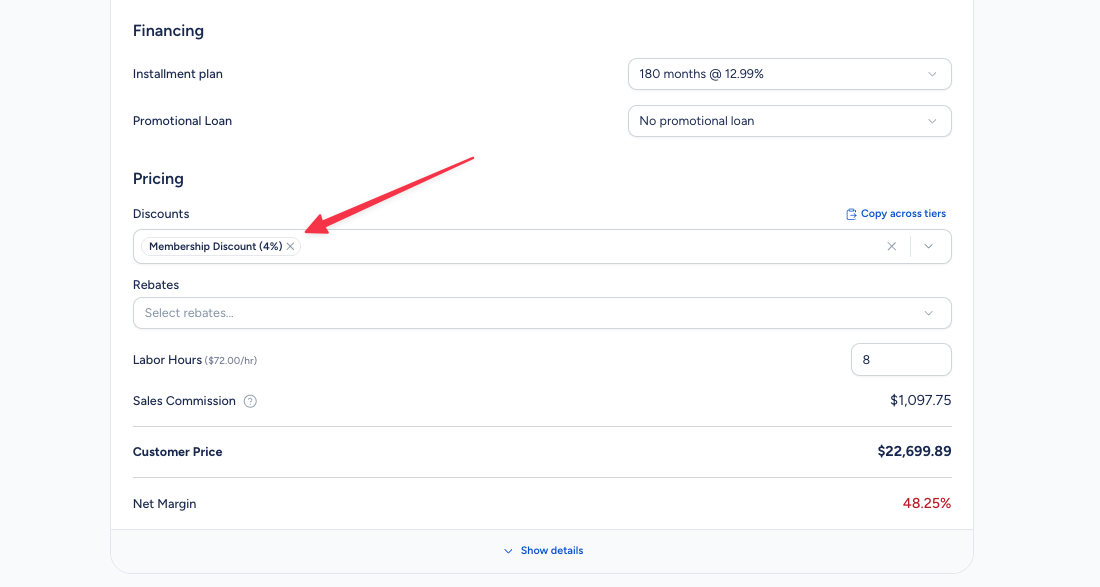
Navigate to the Pricing section at the bottom of the quote configuration.
-
Select an available discount from the dropdown or enter a custom discount amount (if your admin has enabled this).
What Happens to Your Margins
When a discount is applied, SetSale instantly recalculates the Net Margin on the quote screen.
-
If the discount pushes profit below your company's threshold, the margin number turns red as a warning.
-
This gives your team a clear picture of the financial impact before they commit to a price.
Cash Discounts
If your company offers a Cash Discount, you can configure this in Settings > Pricing > Discounts. When a customer chooses a cash payment method, the discount is automatically applied and displayed on the proposal.
Tips
-
You can't accidentally change your company-wide pricing from a single quote — discounts only affect the individual job.
-
Use the real-time margin tracking to train new techs on the financial impact of discounting.