How to Send a Quote to Multiple Email Addresses
Send your quote to multiple decision-makers at once and track who opens it
Need to send a proposal to both the homeowner and their spouse? Or loop in a property manager? You can add multiple recipients when sharing a quote.
Step-by-Step Instructions
-
Open the quote you want to share.
-
Click the Share button in the top right.
-
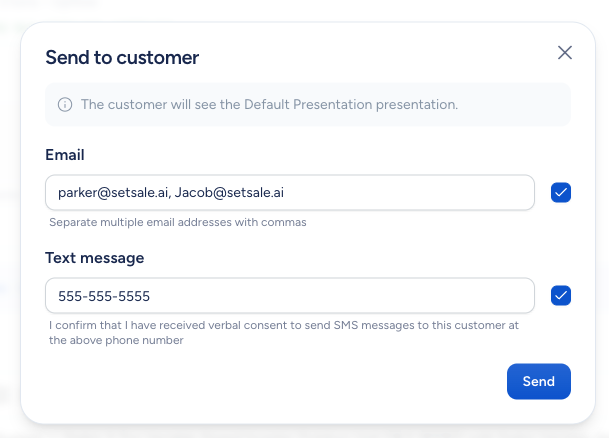
In the recipient field, add all the email addresses you'd like to send the quote to. You can edit the pre-filled addresses or add new ones.
-
Click Send.
Each recipient gets their own link to the interactive presentation, where they can review the tiers, toggle upgrades, and go through the checkout process.
Tips
-
You can also send the quote via text message if the homeowner prefers mobile.
-
SetSale tracks opens per recipient, so you'll see which decision-makers have engaged with the proposal.