Affiliate Surcharge
Build affiliate program fees into your quote price so they don't reduce your margin
How to Use Affiliate Surcharges in SetSale
Some jobs come through affiliate or membership programs (like Costco) that charge you a program fee on every sale. The Affiliate Surcharge lets you build that fee into your quote price so it doesn't come out of your margin.
In this article, we'll walk through how to set a default surcharge rate, how to adjust it on individual quotes, and how it affects your pricing.
How It Works
- It's built into the price. The surcharge is added to the pre-tax price of any quote it applies to.
- Homeowners never see it. There's no surcharge line item on the proposal. The customer just sees the final price.
- Your numbers stay accurate. Commission and financing fees include the surcharge, so your margin isn't eaten by the program fee.
Step 1: Set Your Surcharge Rate (Admins)
Admins set the surcharge rate once at the company level.
- Go to Settings > Pricing > Price Drivers.
- Scroll to the Affiliate Surcharge section.
- Enter the program fee in the Surcharge rate field (e.g., 8 for 8%).
- Check Apply to new quotes if you want every new quote to start with this rate.
- Save your changes.
Step 2: Adjust the Surcharge on a Quote
The surcharge can be changed on each quote without touching your company settings.
- Open the quote.
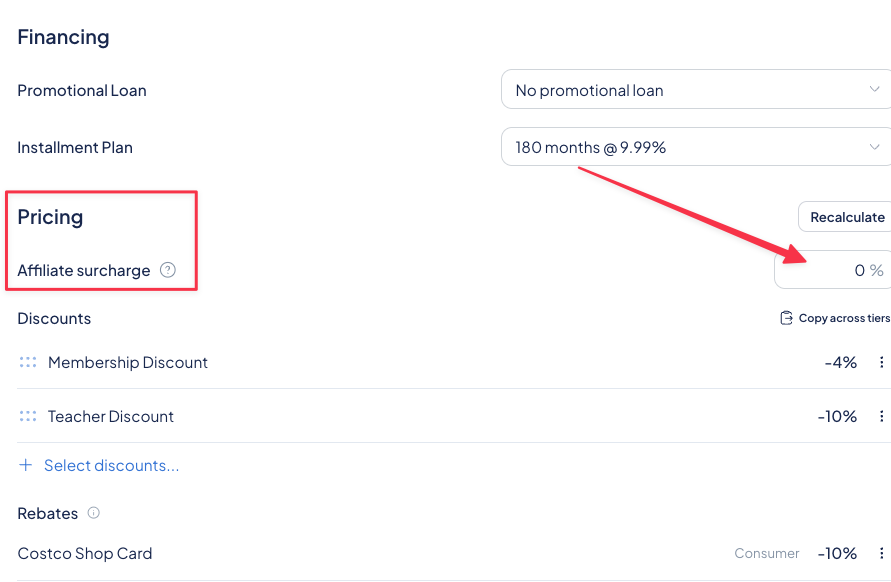
- Find the Affiliate Surcharge field on the quote page.
- Enter a different rate, or set it to 0% to remove it for this job.
What Happens When You Recalculate
When you recalculate a quote:
- Quotes with a surcharge update to your current surcharge rate from Price Drivers.
- Quotes at 0% stay at 0%. Recalculating never adds a surcharge to a quote that doesn't have one.
What About Existing Quotes?
Nothing changes on quotes you've already built. They keep their saved prices until someone adds a surcharge to them.
FAQs
Will the customer see the surcharge on their proposal? No. It's built into the price and never shown to the homeowner.
Does the surcharge affect my commission? Yes. Commission is calculated on the price that includes the surcharge.
Does the surcharge affect financing? Yes. Financing fees include the surcharge.
Does turning on "Apply to new quotes" change my existing quotes? No. It only applies to quotes created after you turn it on.
Need Help?
If you have questions about setting up your affiliate surcharge, reach out to us at support@setsale.ai.