How to Set Selection Rules for Additional Equipment
Choose which heat kit, furnace, or other additional equipment model SetSale uses on quotes by applying automatic, fixed-model, or size-based selection rules.
Selection rules give you more control over the additional equipment included in quotes generated from your System Templates. Instead of using the first available model, SetSale can select equipment based on your preferred model, the requested system size, or the outdoor unit size.
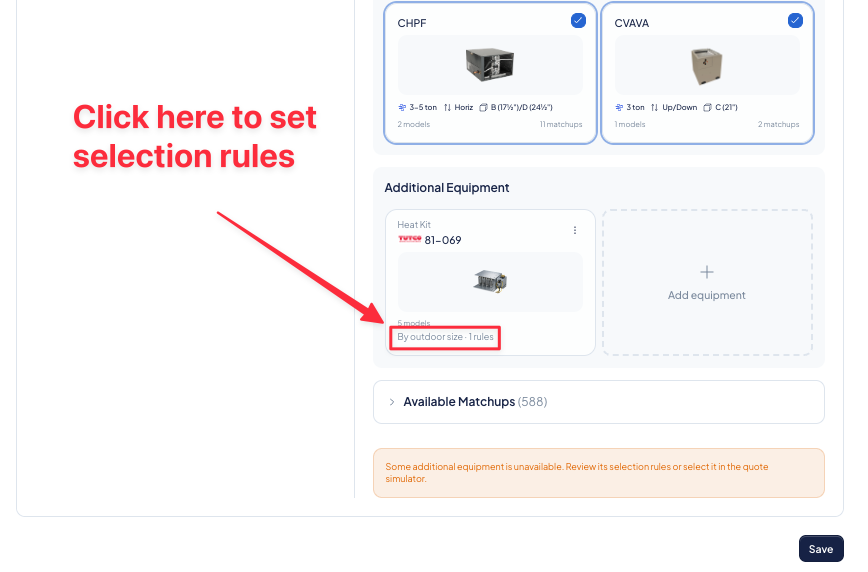
Open the selection rules
- Go to Settings > Quoting > System Templates.
- Open the System Template you want to update.
- Find the tier and additional-equipment card you want to configure.
- Open Selection rules from the additional-equipment card.
Selection rules are configured separately for each additional-equipment item and pricing tier.
Choose a selection method
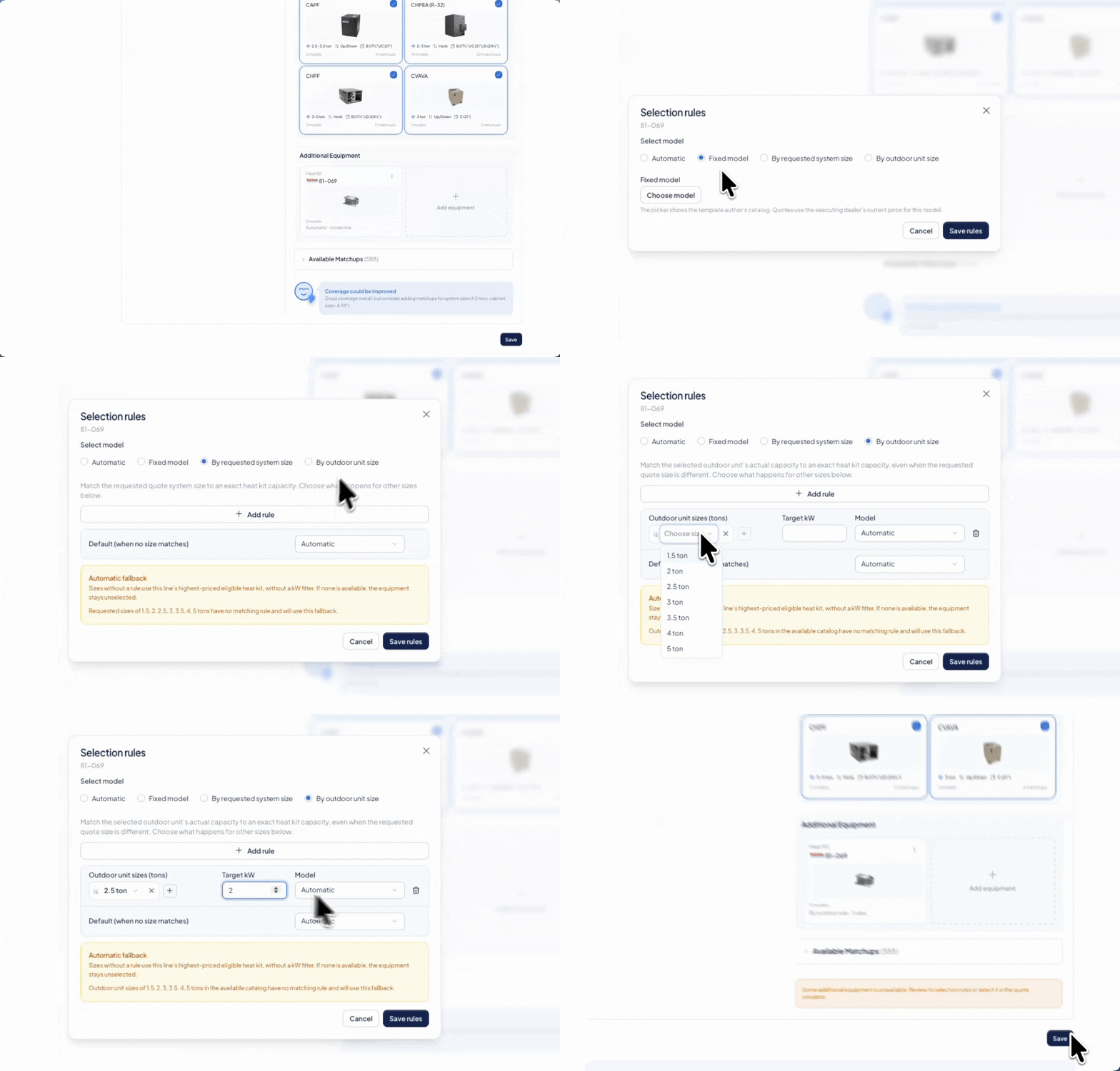
You can choose from four methods:
- Automatic: Selects the highest-priced eligible model from the configured model line using current dealer pricing.
- Fixed model: Always selects the specific model you choose.
- By requested system size: Selects equipment according to the system size requested on the quote.
- By outdoor unit size: Selects equipment according to the size of the outdoor equipment in the selected matchup.
Use a fixed model when you always want the same part number. Use a size-based rule when the correct model or capacity changes depending on the system being quoted.
Create size-based rules
After selecting By requested system size or By outdoor unit size:
- Click Add rule.
- Select one or more system sizes that should use the same equipment capacity.
- Enter the target capacity, such as 15 kW.
- Choose how the model should be selected:
- Select Automatic to use the highest-priced eligible model that matches the target capacity.
- Select Fixed model to use a specific part number.
- Add more rules until you have covered the sizes you regularly quote.
- Configure the Default (when no size matches) option.
- Review the yellow notice for any sizes that are not covered by a rule.
- Click Save rules.
Each size can belong to only one rule. If a size is unavailable in a new rule, it has already been assigned elsewhere.
Configure the default behavior
The default determines what happens when a known size does not match one of your rules.
- Automatic fallback: Selects the highest-priced eligible model without applying a capacity filter.
- Fixed-model fallback: Uses the specific model you select.
The yellow notice in the editor identifies which sizes will use this fallback.
If the outdoor unit size is unknown, or no eligible model is available, SetSale may leave the additional equipment unselected instead of applying an unsuitable model. You can then select the equipment manually on the quote or adjust the template.
Example: selecting heat kits by size
Suppose your 2-ton and 2.5-ton systems both require a 15 kW heat kit:
- Choose By outdoor unit size.
- Add 2 ton and 2.5 ton to the same rule.
- Enter 15 as the target kW.
- Choose Automatic to use the highest-priced eligible 15 kW model, or choose Fixed model to specify an exact part number.
- Configure a default for any sizes that are not covered.
How furnace selection works
If a System Template includes a furnace as additional equipment, SetSale now uses the requested furnace specifications to find a matching model. No additional setup is required unless you want to apply your own selection rules.
What happens to quotes
- New quotes use the current selection rules.
- Existing saved or sent quotes do not change automatically.
- If you change the system on an existing quote and regenerate its equipment, SetSale applies the current rules. This may change the selected model and quote price.
- If no eligible equipment is available, the additional-equipment item may remain unselected.
Before sharing a new or regenerated quote, confirm the equipment model, capacity, and price in the quote simulator.