How SetSale Calculates Markup Pricing
Learn how SetSale builds your quote price by adding markup on top of equipment and labor costs to calculate your profit
How SetSale Calculates Markup Pricing
In this article, we'll walk through how SetSale builds a quote price using Markup Pricing. Markup adds a percentage on top of your job costs to create your profit. It's quick to set up and easy to explain, which is why many contractors start here.
By the end, you'll know exactly how each number on a quote is calculated — and why your markup percentage isn't the same as your profit margin.
Turn On Markup Pricing
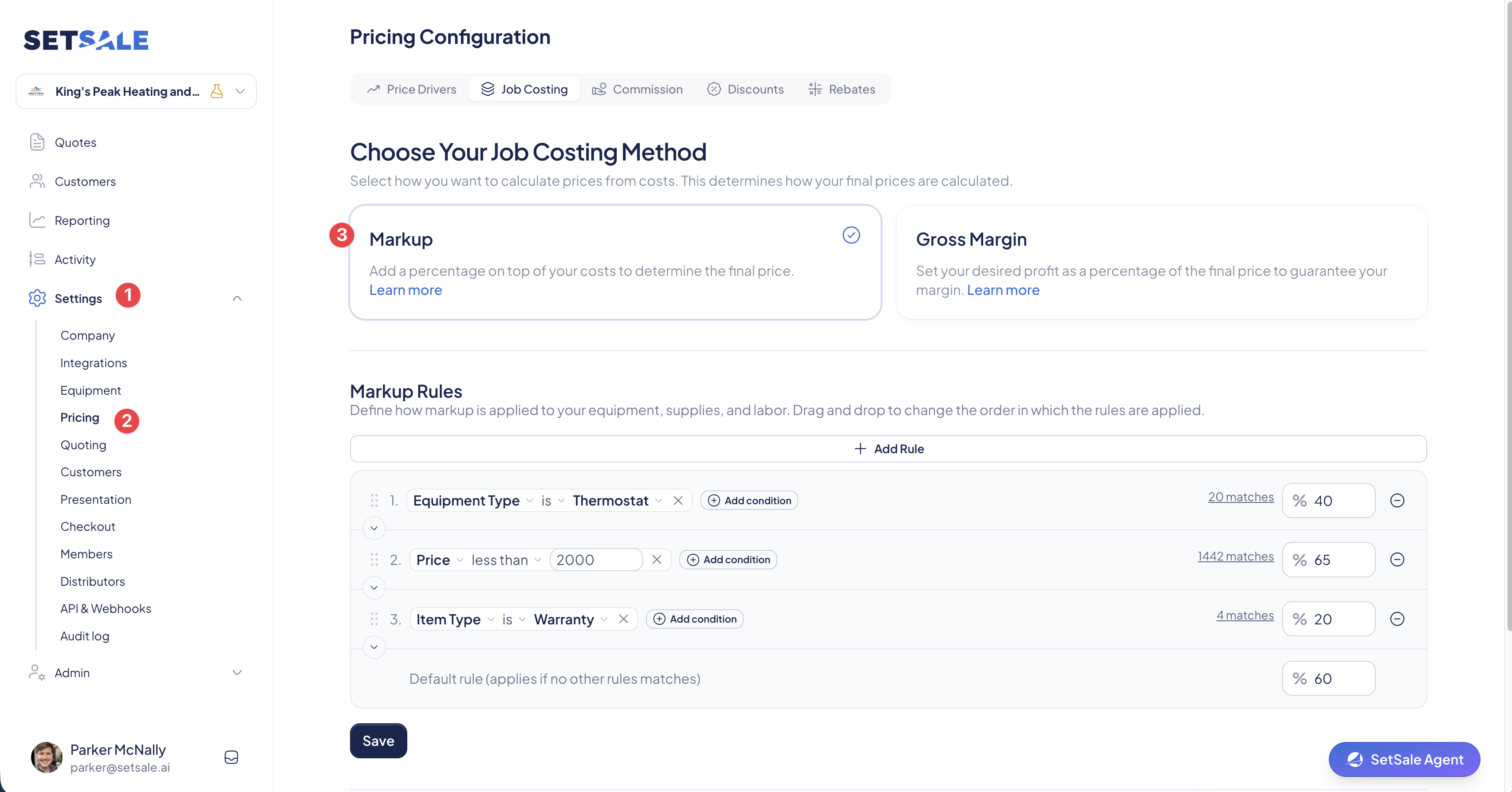
- Click Settings in the left menu.
- Select Pricing, then Job Costing.
- Choose Markup as your pricing model.
- Enter your Markup Percentage.
- Click Save.
How the Price Is Built
Step 1: Direct Costs
These are the costs tied directly to the job.
- Equipment Cost: Primary equipment + additional equipment + install supplies + thermostats.
- Labor Cost: Total install hours × (lead installer cost per hour + helper cost per hour).
Direct Cost = Equipment Cost + Labor Cost
Step 2: Overhead
Overhead covers the cost of running your business — office, admin staff, fuel, utilities, and so on. You can set it two ways:
- Percentage: Overhead % × Direct Cost
- Flat dollar amount: The same fixed amount on every quote
Step 3: Markup
Markup is your profit. SetSale applies it to your Direct Cost (equipment + labor).
Markup = Direct Cost × Markup %
Markup rules let you use different percentages for different items. For example, a higher markup on equipment than on labor, or 0% on pass-through items like extended warranties or permits.
- SetSale checks each line item and applies the first matching rule.
- The Matches indicator on the Job Costing page shows which rule each item is using.
- Items that don't match a rule use your default markup percentage.
Step 4: Discounts
Subtotal Before Discounts = Direct Cost + Overhead + Markup
Any discounts are applied next. Flat dollar discounts come off first, then percentage discounts. Every dollar of discount comes straight out of your profit.
Step 5: Sales Commission
Commission is calculated on the discounted price and added on top.
**Commission = Discounted Price × Commission %**Subtotal = Discounted Price + Commission
The price of any upgrades the homeowner selects is also added at this stage.
Step 6: Rebates, Tax, and Financing
- Utility and Manufacturer rebates are subtracted from the subtotal. Consumer rebates show on the quote but don't change the price.
- Sales tax is calculated after rebates, based on the tax option selected on the quote (physical goods only, labor only, goods and labor, or entire ticket).
- Financing fees from the selected plan are added, along with any credit card fees set in your company settings.
Final Customer Price = (Subtotal − Instant Rebates) + Sales Tax + Financing Fees
Example: Markup vs. Margin
Here's a job priced with a 60% markup, 20% overhead, and 5% commission.
| Line | Amount |
|---|---|
| Equipment | $5,000 |
| Labor | $1,000 |
| Direct Cost | $6,000 |
| Overhead (20% of Direct Cost) | $1,200 |
| Markup (60% of Direct Cost) | $3,600 |
| Subtotal Before Discounts | $10,800 |
| Commission (5%) | $540 |
| Subtotal | $11,340 |
Net Profit: $11,340 − $6,000 − $1,200 − $540 = $3,600 Net Margin: $3,600 ÷ $11,340 = 31.7%
A 60% markup produced about a 32% net margin. Now add a 10% discount:
- Discounted price: $9,720
- Commission: $486
- Subtotal: $10,206
- Net Profit: $2,520
- Net Margin: 24.7%
That 10% discount cost you 30% of your profit on the job.
💡 Markup Is Not Your Margin
Your markup percentage is calculated on cost. Your net margin is calculated on the selling price, after overhead and commission. That's why a 60% markup never means 60% profit.
If you want to set the exact margin you earn on every job, check out Gross Margin Pricing — you enter your target margin, and SetSale solves for the price.
Troubleshooting
My net margin is lower than my markup percentage. That's expected. See the example above — overhead, commission, and discounts all come out of the markup.
An item isn't getting the markup I expected. Open Settings → Pricing → Job Costing and check the Markup Rules indicator. The item may be matching a different rule higher in the list.
The net margin on my quote turned red. The quote has dropped below your Target Net Profit Health Threshold, usually because of a discount. Remove or reduce the discount, or review your markup rules.