How to Set Up and Manage Install Supplies in SetSale
Set up install supplies and auto-add rules so material costs are automatically captured on every quote without manual entry
How to Set Up and Manage Install Supplies in SetSale
Install supplies are the parts and materials every job needs — pads, whips, disconnects, PVC, and more. When you set them up in SetSale and automate when they're added, every quote captures those costs without your techs having to remember them in the field.
In this article, we'll cover how to choose a tracking approach, add supplies, set up auto-add rules, and adjust supplies on individual quotes.
How Install Supplies Work
Install supplies are built into the price of each tier. They're part of your cost of goods sold (COGS), so your margins stay accurate — but they don't show up as a separate priced line item for the homeowner, and the homeowner can't remove them.
Choose Your Approach
Before adding items, decide how your business tracks materials:
- Parts and pieces: List each component individually (e.g., Pad, Disconnect & Whip, PVC & Misc). Best if you want detailed job costing on every ticket.
- Install kits (bundles): Roll all your materials into one item (e.g., "Heat Pump Install Kit"). Simpler to manage, and still captures the full cost in your pricing.
Either approach works with auto-add rules — pick the one that matches how you already cost your jobs.
Add an Install Supply
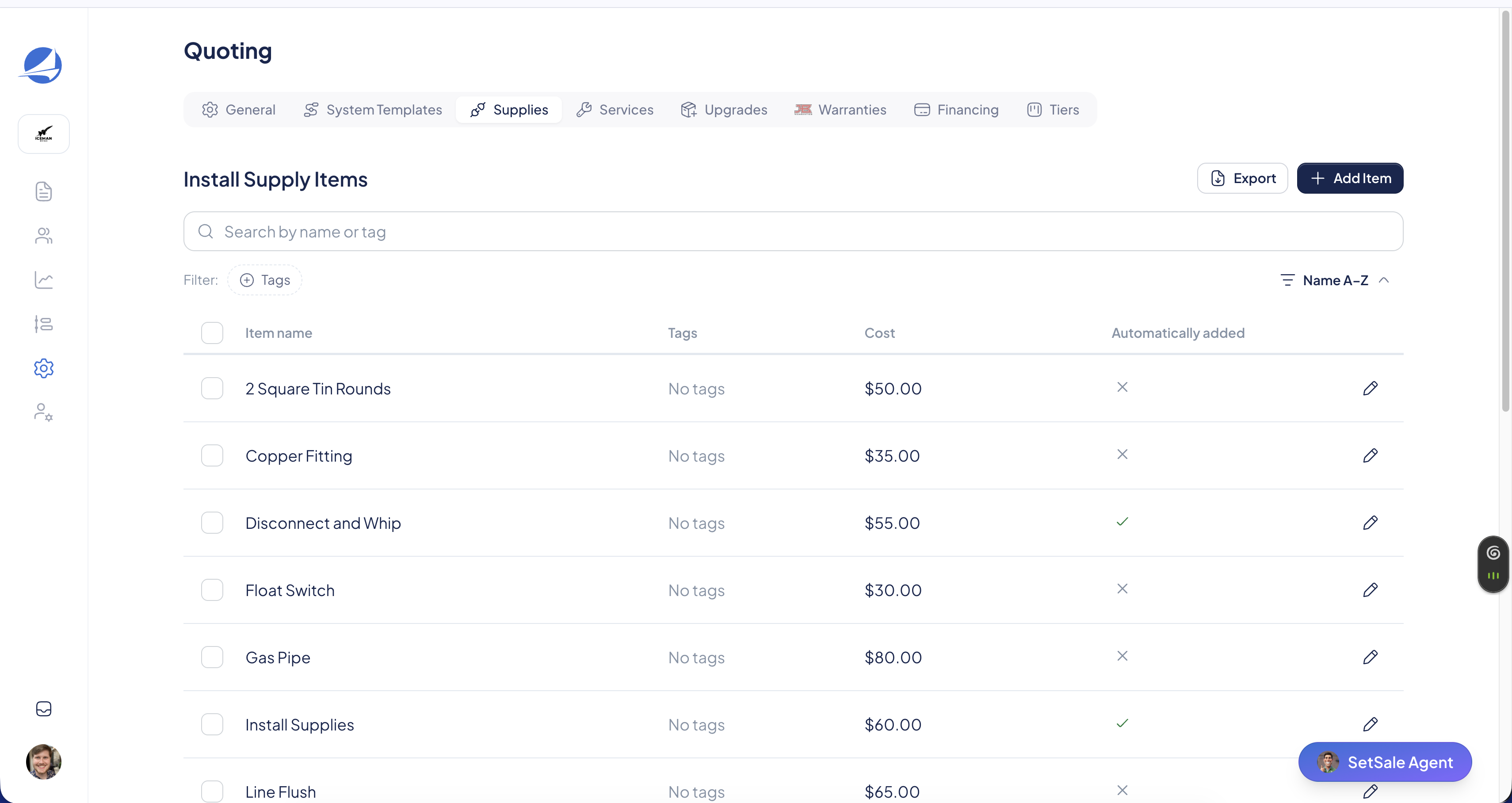
- Go to Settings → Quoting → Supplies.
- Click Add Item, then select Add Manually.
- Enter a name (e.g., "Disconnect" or "Full Install Kit").
- Enter your cost for the item.
- Set the Automatically Added rule (see below).
- Save the item.
Set Up Auto-Add Rules
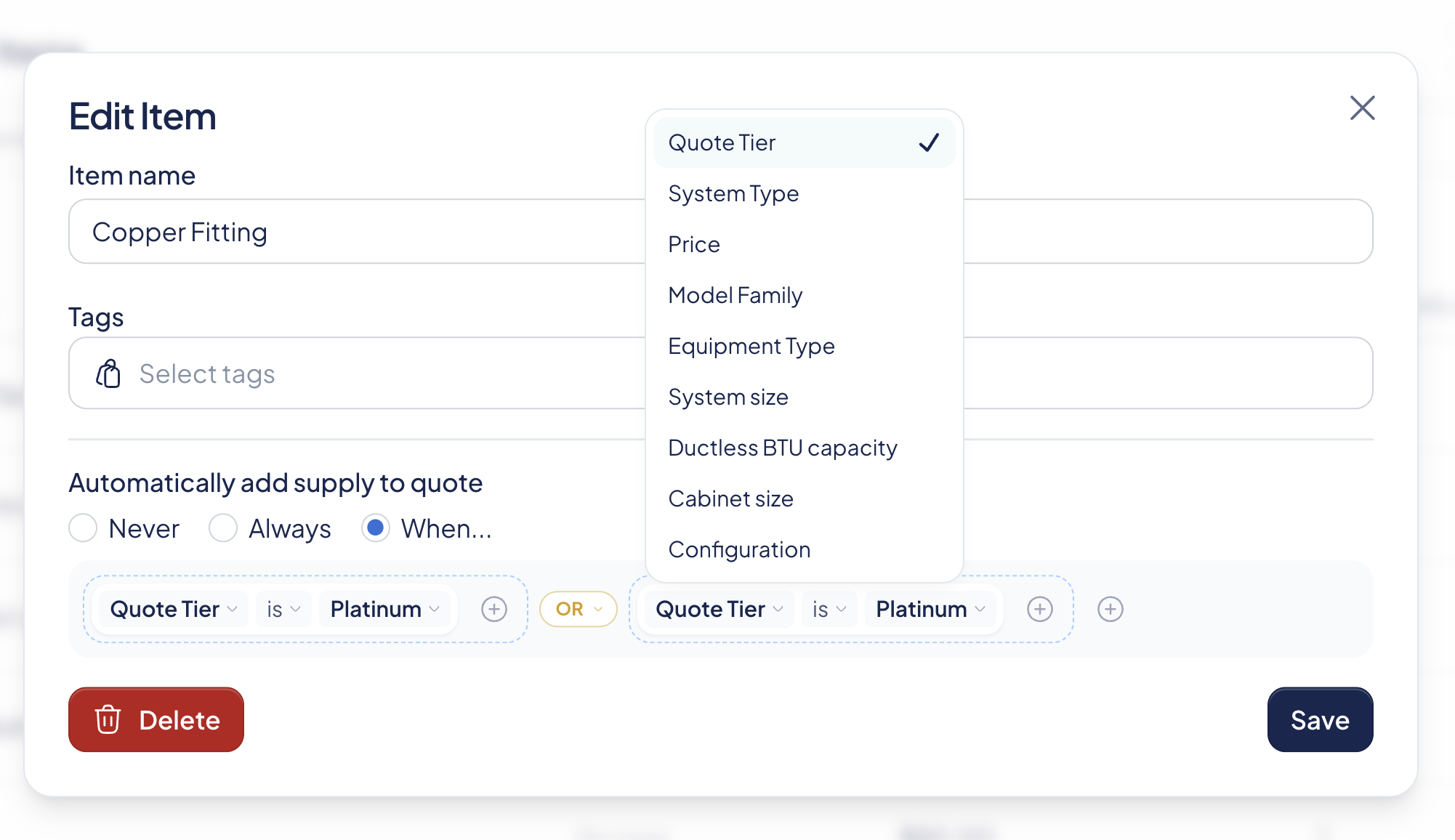
The Automatically Added setting controls when a supply lands on a quote. You can see each item's rule at a glance in the Automatically Added column on the Supplies tab.
Never
The supply isn't added automatically. Techs can still add it manually on a quote.
Always
The supply is added to every quote, on every tier. Good for a general install kit or items used on every job.
When
The supply is added only when the conditions you set are met. Available conditions include:
- Quote Tier — Add the supply only to a specific tier (e.g., Platinum).
- System Type — Add the supply when the quote includes a specific system type (e.g., Heat Pump, AC & Furnace, Packaged Gas).
- Price — Add the supply when the ticket price is more or less than an amount you set.
- Model Family — Add the supply when a specific model family is quoted.
- System Size — Add the supply when the system is a certain size (e.g., 4- or 5-ton systems).
- Ductless BTU Capacity — Add the supply when a ductless system matches a specific BTU capacity.
- Cabinet Size — Add the supply when the equipment matches a specific cabinet size.
- Configuration — Add the supply for a specific equipment configuration.
Combining Conditions
Click Add Condition to layer rules together using AND/OR logic. For example:
- Add a condensate pump when the system type is AC & Furnace AND the configuration is Horizontal.
- Add a larger pad when the system size is 4 tons or more.
- Add a line set kit when the system type is Heat Pump OR AC & Furnace.
What Happens on a Quote
Supplies update as the tech builds the quote. When a tech selects or changes equipment, SetSale automatically adds the supplies that match your rules — and removes ones that no longer apply. A real-time alert shows the tech exactly what was added or removed, so nothing changes silently.
Techs keep full control. On any quote, a tech can:
- Edit quantities inline
- Edit the price of a supply
- Delete a supply that isn't needed
- Manually add a supply that wasn't auto-added
Tips
💡 Start with your most common items. Set up auto-add rules for the supplies used on most jobs first, then add size- or configuration-specific rules over time.
💡 Use size conditions for size-dependent parts. Pads, line sets, and disconnects often vary by tonnage — System Size and Ductless BTU Capacity make sure the right one lands on the quote.
💡 Build a quote to test your rules. After setting up auto-add rules, build a test quote to confirm the right supplies appear on each tier.